Some findings and personal understanding from studying ACES. The whole of ACES can be seen as an open, complete and reasonably good colour management system, and it can deepen and fill out your understanding of colour science. Even just the IDT/CSC part has plenty of details worth paying attention to.
IDT: Not a Very Good Name
Back in ACES 1.x, the conversion from various device spaces into the ACES pipeline (usually into the ACES 2065-1 space) was called an Input Device Transform (IDT). I do not think this name is very good, because it gives the impression of corresponding to an Output Device Transform (ODT). But in reality IDT and ODT differ greatly, both in what they do and in the arithmetic flow. A similar naming problem exists with OETF and EOTF.
Starting with ACES 2.0 it was given a new name, Color Space Conversion (CSC), which is closer to what it actually does. It is close to DaVinci’s non-clipping colour space transform (CST): it converts from a camera related (not device independent) scene-referred value into a device independent unified space, and in essence it is the same as converting between RGB spaces.
The Specific Process of CSC
Since the essence is RGB to RGB conversion, the process is the same, following this path:

Non-linear Mapping
RGB with a prime mark means non-linear. I use the concept of OETF here because I think Log also counts as a kind of OETF, and the CSC at the input stage always operates in scene-referred terms. If it were a display-referred space, the non-linearity would be an EOTF instead.
For the ACES CSC, the inverse of the upper OETF means Log Decoding, and the lower OETF is linear, since ACES 2065-1 is a linear RGB space.
RGB to and from XYZ
RGB spaces are generally considered device dependent (a well defined RGB space is in fact device independent). Converting between two RGB spaces needs a common space in between, such as XYZ. Linear RGB and XYZ are converted by a 3 by 3 matrix, and this matrix can be computed from the colour coordinates of the RGB primaries and the white point.
For the maths behind it you can refer to this slightly rough early blog post.
Chromatic Adaptation
Every RGB space has its own white point, for example the common D65, or the near D60 white point used by ACES.
If you simply chain two RGB to XYZ conversions together and the white points differ on each side, then an input neutral colour with R=G=B produces an output where the RGB values are no longer equal, turning into a non-neutral colour. In colour management this is called absolute colorimetric.
What a CSC usually needs is relative colorimetric, keeping neutrals neutral, which requires a chromatic adaptation transform (CAT) in XYZ space to convert the white point. These days all kinds of chromatic adaptation can be found, and the most common ones in colour management are linear Bradford and CAT02.
Chromatic adaptation is based on von Kries theory, and I will not repeat the principle here. The flow is shown below:

It consists of three matrices multiplied together, and the diagonal matrix in the middle performs complete white point adaptation in LMS space. The difference between different chromatic adaptations is the values of the first and third matrices.
Simplification
According to the CSC flow diagram at the beginning, in the ACES input all you need is to apply Log Decoding to go linear, then use a 3 by 3 matrix to transform into ACES 2065-1 RGB.
This matrix is the product of five matrices, which together perform RGB to XYZ, XYZ to LMS, LMS chromatic adaptation, LMS to XYZ and XYZ to RGB.
In colour-science these transforms are all wrapped up, and calling the high level functions gives you the matrix as well as the Log to linear conversion.
import colour

colour.log_decoding(x, "ARRI LogC4")

colour.matrix_RGB_to_RGB("ARRI Wide Gamut 4", "ACES2065-1")
The default chromatic adaptation is CAT02, and you can specify others. The resulting matrix agrees closely with the M ACES in the LogC4 white paper.
The Blame Is All on the White Point
The white point colour coordinates of the ACES space are x=0.32168, y=0.33767, which differ very slightly from the standard illuminant D60. It is not the D60 that people often mention online.
This white point is different from the white points of almost all common RGB spaces, so entering and leaving ACES necessarily relies on a chromatic adaptation transform. This brings at least two risks.
Which Chromatic Adaptation?
In ST 2065-1, CAT02 is recommended, but the default value in the ACES Core Github repository is Bradford.
Although the difference may be very small, unnecessary error should not be introduced here. After all, one of the goals of ACES is to unify footage from different cameras. To be rigorous, you need to confirm which chromatic adaptation is used in the DCTL provided by the manufacturer (and whether it is accurate), or which chromatic adaptation is applied on the node in DaVinci. You might even use a separate chromatic adaptation node to choose precisely.
There are further conversions inside ACES. For example, most operations in the ODT are done in JMh, and converting between RGB and JMh also needs chromatic adaptation. The chromatic adaptation inside the ODT is close to CAT16 but not exactly the same, so the complete pipeline from input to output contains several chromatic adaptation steps based on different algorithms, which is not elegant at all.
Out-of-gamut Caused by Chromatic Adaptation
AP0 was designed to fully cover the horseshoe, and some camera RGB encoding spaces were designed to be tangent to AP0, such as Arri Wide Gamut 4 and D-Gamut2, in order to avoid negative values when entering the ACES pipeline.
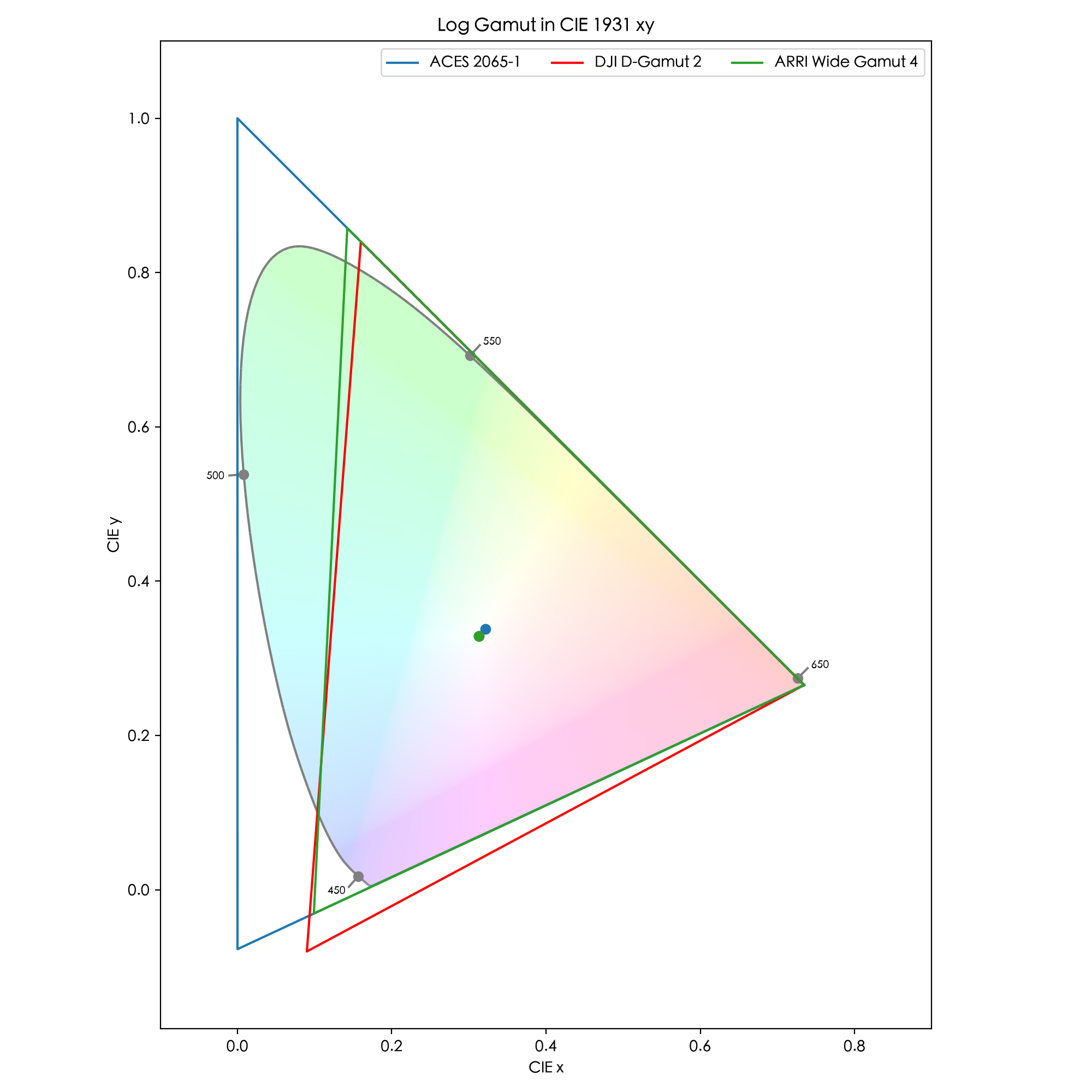
After chromatic adaptation, the whole RGB space shifts a little. A space originally designed to be exactly tangent will then have some boundary regions outside AP0, producing negative values. Although the degree is slight, it still needs attention, especially when a completely lossless inverse transform is required. This is also mentioned in the LogC4 white paper.

For example, the blue primary of AWG4, after entering ACES 2065-1 with CAT02, has the code value (0.10462, -0.00822, 1.00135).
The Clever Use of CST
In DaVinci the node that performs this kind of conversion is called Color Space Transform (CST). The basic conversions above ensure that the exact physical position of colours does not change, but different spaces have different sizes, so going out of gamut is inevitable. Mathematically this shows up as negative numbers or numbers above the upper limit. The CST node can additionally apply gamut compression and tone mapping to deal with these numbers, but that may destroy the originally exact physical positions.
Turn off both gamut compression and tone mapping on the CST node and enable chromatic adaptation, and it is equivalent to the ACES IDT or the input CSC.
In DaVinci there are various ways to do the input CSC. You can use CST, a DCTL provided by the manufacturer, or an ACES node, and in theory they are all correct and consistent. But you should pay attention to differences in the chromatic adaptation method, to how out-of-gamut cases are handled, and be careful about manufacturers providing incorrect DCTLs.
Here is a CSC DCTL with CAT02 chromatic adaptation for Vivo-Log Vivo Wide Gamut, with the matrix precomputed.
Update 2026.09.22: today Vivo released an unencrypted DCTL for implementing the ACES IDT, and the white point adaptation used in it is closer to XYZ scaling rather than CAT02 or Bradford. Please do not mix it with the DCTL provided above.