Judging codecs and visual performance using only PSNR and a small handful of sample images is rather limited, so the conclusions here need more testing to be confirmed.
Output Formats
For a long time, the output formats available in photo editing software have been JPEG, TIFF and the like. My most used format has been the highest quality JPEG the software offers, switching to 16-bit TIFF only for things like printing.
The downside of this approach: even the highest quality JPEG still involves some lossy compression (around 48 dB PSNR compared with TIFF), the files are fairly large, and the bit depth is only 8-bit, which feels a bit low spec for a digital master meant for “archival” purposes. Going with 16-bit TIFF instead does give you lossless quality and high bit depth, but files routinely run to a hundred megabytes or more, which is hard to swallow.
With so many advanced codecs around these days, could JPEG-XL or AVIF change this situation? After some simple image quality assessment and file size testing, I’ve decided to adopt the following photo archiving workflow for the foreseeable future:
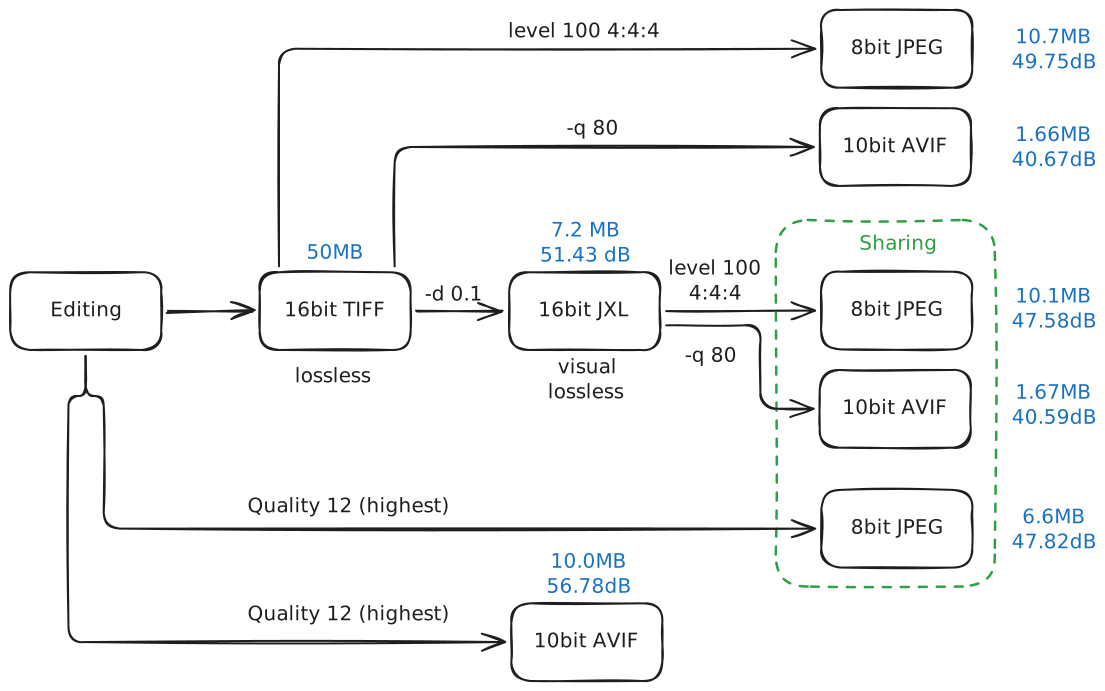
The file sizes and PSNR figures in the flowchart were measured on a photo with a long edge of 3840 px; photos straight from a camera will generally be larger.
The Master Choice: JPEG-XL
In the diagram, left to right runs from the photo editor, gradually stepping down in quality and file size, through to archiving and sharing.
The most common high spec output from photo editors is 16-bit TIFF, and JPEG-XL supports 16-bit depth too. Although its lossless mode doesn’t compress that well (about 1.5:1), as long as you can accept a tiny bit of lossy compression, it can achieve very high compression ratios.
JPEG-XL measures image quality using distance in the XYB space, which is modelled on cone responses. A distance of 1 represents one JND (just noticeable difference) unit and is described in JPEG-XL as “visually lossless”. Tempting as the compression at distance 1 is, sometimes even reaching 40:1, the image quality at that point falls short of the old maximum quality JPEG, with PSNR around 42 dB. Our shiny new digital master can hardly look worse than what came before, can it?
To balance compression ratio against image quality, I’ve settled on a distance of roughly 0.1 to 0.3. At high bit depth this beats the old maximum quality JPEG while shrinking the file to under 50% of its original size. For one example image, the JPEG and JXL comparison looks like this:
| Format | distance | File size | PSNR |
|---|---|---|---|
| JPEG | - | 26.0 MB | 48.6 dB |
| JPEG-XL | 0.1 | 22.9 MB | 52.9 dB |
| JPEG-XL | 0.2 | 15.2 MB | 49.7 dB |
| JPEG-XL | 0.3 | 11.7 MB | 47.9 dB |
So the master format in the new workflow is a high quality JPEG-XL, replacing the old TIFF. At quality levels between lossless and visually lossless, the file comes in at under a tenth the size of a TIFF, and still 50% smaller than the old JPEG.
Why Not AVIF
Measured purely on PSNR, AVIF produces smaller files than JPEG-XL at the same quality. The reason I don’t pick AVIF at the archiving step is bit depth. AVIF natively supports 8, 10 and 12-bit, and can reach 16-bit depth by encoding two frames, one 12-bit and one 8-bit. Although quantising an edited image to 16, 12 or even 10-bit makes no visible difference, and displays will be stuck at 8-bit for a good while yet anyway, from an archiving and sheer perfectionism point of view, I still want a 16-bit master. At the very least, it sounds rather satisfying.
For comparison, I also ran a test on one image:
- At 10-bit, AVIF reaches 56.78 dB PSNR at a file size of 10.02 MB. JPEG-XL at essentially the same PSNR is slightly larger at 10.79 MB.
- At 10-bit, AVIF reaches 51.506 dB PSNR at 5.51 MB. JPEG-XL reaches a slightly lower 51.427 dB PSNR at a slightly larger 7.19 MB.
Worth noting: this result comes from a single test image, so AVIF may simply suit this particular image better, and PSNR isn’t a particularly good metric anyway. That said, AVIF’s advantage at somewhat lower bitrates is widely acknowledged, while at very near lossless settings its performance is close to or slightly behind JPEG-XL.
Still, thanks to its excellent browser compatibility and strong low bitrate performance, AVIF will be my first choice of format for sharing.
As for AVIF’s 16-bit mode, here’s how to encode and decode it:
avifenc --depth 12,8 --lossless input.png output.avif
avifdec --sato -d 16 output.avif decode.png
AVIF’s lossless mode is dreadful, and this 16-bit mode is nothing special either. With lossy compression at the same PSNR, JPEG-XL files come out at a quarter to a ninth the size of AVIF’s.
Recompression
A digital master sounds lovely, small yet mighty, but compression is compression, and I’d rather it didn’t affect the sharing and use that come afterwards.
In practice, you still need to export formats like JPEG from the master for sharing, which means compressing an already compressed JPEG-XL a second time. This double compression does bring extra loss, but since the first step is very close to lossless, and the drop from high to low bit depth adds some extra headroom, testing shows that a recompressed JPEG or AVIF comes quite close to one compressed straight from TIFF. At the same compression quality, the PSNR drop versus TIFF is 1 to 2 dB, and the gap gradually narrows as you compress harder. For example, when recompressing to AVIF at quality 80, the TIFF derived AVIF scores 40.67 dB PSNR, while the one recompressed from JPEG-XL scores 40.59 dB.
Unfortunately, if the old workflow was exporting a maximum quality JPEG directly, and the new one outputs JPEG-XL first and then a maximum quality JPEG from that, the new JPEG will always be slightly worse than the old one.
But if your previous workflow wasn’t using maximum quality JPEG (I sometimes pick 90 or 95 to save a bit of space), then in the new workflow, choosing 95 or 100 when recompressing to JPEG gives you a better JPEG than before.
Right now, my two recompression formats are JPEG and AVIF: JPEG for maximum compatibility (Android phones, say), and AVIF for iPhone and web use. AVIF quality is usually set between 70 and 85, giving 1 to 2 MB for a 4K photo; most photos on this blog are exactly that spec.
How to Put It to Use?
ACR and Lightroom
If you use ACR or Lightroom regularly, these advanced formats are already available at export. ACR remaps the quality options, presenting users with levels 0 to 12, with 13 being lossless.
After a little testing, level 12 JPEG-XL corresponds to roughly distance 0.1, and level 10 to about 0.6. Try level 11 or 12 JPEG-XL to generate your master files.
On the AVIF side, level 12 quality is extremely high, with PSNR well above level 12 JPEG-XL, roughly equivalent to JPEG-XL at distance 0.035, while level 11 sits fairly close to level 12 JPEG-XL. Lower quality AVIF works nicely for sharing.
Even at its highest level, ACR’s JPEG can’t match Capture One or other encoders set to quality 100; PSNR is about 3 dB lower, though the files are a bit smaller too.
Capture One
Something like Capture One, which supports rather few formats (not even 16-bit PNG), has to go through TIFF as an intermediate.
First save a lossless TIFF, then transcode it to PNM, an uncompressed format that is basically raw code values, or to PNG. The point of this step is to give libjxl’s tools something they can read. Then run:
cjxl input.pnm output.jxl -d 0.2and the JPEG-XL compression is done. If you need EXIF, add an extra step to carry it over from the TIFF to the JPEG-XL.
Converting from JPEG-XL to AVIF works much the same way, with PNG recommended as the intermediate format.
djxl input.jxl output.png
avifenc -d 10 -q 80 output.png output.avif
Of course, you could also modify and compile libjxl and libavif yourself for a more efficient pipeline.
A Brief Embrace of the Future
Quite a few issues with this setup have already come to light. I’d like to give it some time, actually put it to real use, and gradually find room for improvement. At the very least, it lets me embrace the future for a little while.
Here are some of the issues I’ve run into, along with my thoughts:
- JPEG-XL encoding speed: pure
libjxlencoding runs at about 10 MP/s on an M1 Pro, so a 30 MP photo takes around 3 seconds, plus some extra IO overhead. There’s room for optimisation. - On macOS, opening a folder full of JPEG-XL files takes a while to generate previews. I’m trying to solve this by embedding a tiny JPEG preview.
- JPEG-XL’s compatibility is poor. For a master format, weak compatibility is forgivable, but I still hope that over time JPEG-XL will be supported by more apps and systems.
- HDR support. With so many different image formats involved, converting between them while keeping HDR information intact will probably be a hassle. Then again, if HDR output ever is genuinely needed, 16-bit paired with PQ should be good enough.
- Wide gamut support. I’ve thought about switching the master to P3 or even Rec. 2020, but that would mean bringing colour management and gamut mapping into the step where files are transcoded to sharing formats.